




News & Blogs
Ink phase separation, viscosity drift, and frequent nozzle clogging in Continuous Inkjet (CIJ) printers are among the most persistent challenges on industrial packaging lines. When ink components separate, coded text becomes faint, blurry, or completely illegible, leading to unreadable batch codes, compliance failures, and costly line downtime.
In most cases, ink separation is not caused by a defective printer component, but rather by unmanaged ambient temperature swings and humidity fluctuations within the production environment.
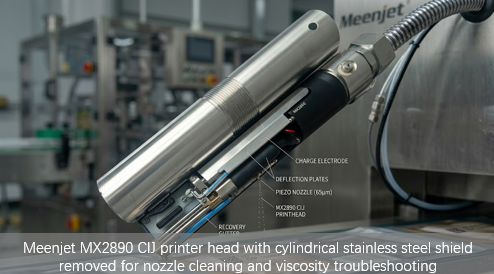
1. Why Temperature & Humidity Cause CIJ Ink Separation
Continuous Inkjet systems rely on a delicate chemical equilibrium between pigments or dyes, resin binders, conductive salts, and volatile fast-drying solvents (such as MEK, ethanol, or acetone). Fluctuations in plant environmental conditions disrupt this balance in three main ways:
Viscosity Drift from Temperature Swings:
As ambient temperature rises, solvent evaporation accelerates rapidly. This reduces the solvent-to-resin ratio, increasing ink viscosity (η) and altering droplet formation. Conversely, cold temperatures increase solvent retention, lowering viscosity and weakening droplet charge—both conditions destabilize the ink jet and trigger nozzle clogging.
Moisture Absorption & Surface Condensation in High Humidity:
In environments with relative humidity (RH) exceeding 65%, ambient moisture is absorbed into the solvent blend—particularly into the alcohol components (ethanol, isopropanol) of the ink formulation—during gutter recirculation. Additionally, surface condensation forms on cold ink lines. The absorbed water reduces the solubility of resin binders and pigment dispersants, causing solid components to precipitate out of suspension (phase separation).
Pigment Settling During Downtime:
When production lines stop during overnight shifts or weekends in unconditioned facilities, cold temperatures accelerate the sedimentation rate of suspended solid particles, forming dense sludge at the bottom of the reservoir and fluid line elbows.
2. Step-by-Step Troubleshooting: Resolving Ink Line Separation
If your CIJ printer displays viscosity errors or shows signs of ink separation, follow this 3-step technical optimization process:
Step 1: Recalibrate Viscosity & Makeup Solvent Ratios
Check Automated Viscosity Readings: Verify that the internal viscometer matches manual cup readings (e.g., Zahn Cup #2).
Adjust Makeup Dosing: Ensure the makeup solvent reservoir is filled with fresh, manufacturer-approved fluid to prevent over-concentration of resin binders during high-heat operations.
Step 2: Stabilize the Local Operating Micro-Climate
Relocate Fluids Away from Heat Sources: Ensure the CIJ cabinet and fluid bottles are positioned away from hot-melt glue tanks, drying tunnels, or direct sunlight.
Install Cabinet Positive Pressure / Climate Kits: Use positive-pressure cabinet cooling units or air-conditioned enclosures to maintain stable operating parameters.
???? CIJ Operating Environment Quick Reference Card
Parameter | Recommended Range | Critical Threshold (Action Required) |
Ambient Temperature | 18°C – 28°C (64°F – 82°F) | < 15°C or > 32°C (System Drift Risk) |
Relative Humidity | 30% – 55% RH | > 60% RH (Install Dehumidifier / Enclosure) |
Airflow (Drafts) | Minimal, stable | Direct hot/cold air jets on cabinet |
Ink Storage | 15°C – 25°C (59°F – 77°F) | > 30°C (Accelerates Ink Aging) |
Pro Tip: Install a small digital temperature/humidity data logger near the CIJ cabinet to log 24-hour trends. Most intermittent failures correlate directly with overnight temperature drops or midday humidity spikes.
Step 3: Perform Scheduled Fluid Line Flushes
Flush Recirculation Gutters: Execute an automated solvent flush before extended shutdowns to clear residual ink from the gutter and nozzle orifice.
Agitate Pigmented Inks: If using heavy-pigment white or yellow inks, ensure the internal magnetic agitator runs continuously—even when the printer is in standby mode.
3. CIJ vs. TIJ: Eliminating Fluid System Vulnerabilities
While environmental controls help mitigate ink separation in traditional CIJ printers, maintaining fluid chemistry requires continuous monitoring, solvent refills, and routine filter replacements.
Operating Parameter | Continuous Inkjet (CIJ) Systems | Thermal Inkjet (TIJ) Alternatives |
Fluid Circuit Complexity | High (Pumps, Valves, Recirculation Gutters) | Zero (Closed Cartridge System) |
Viscosity Management | Requires Active Solvent/Makeup Dosing | None (Pre-formulated Factory Sealed) |
Humidity Sensitivity | High (Alcohol Phase Separation Risk) | Very Low (Sealed Nozzle Plate) |
Maintenance Burden | High (Frequent Flushes & Filter Changes) | Zero Maintenance (Replace Cartridge) |
Downtime Risk | High (Phase Separation & Nozzle Clogging) | Negligible (Instant Start-Up) |
4. Upgrade Your Line: Zero-Maintenance Thermal Inkjet Solutions
For facilities operating in challenging environments with fluctuating temperatures or high humidity, switching from complex CIJ fluid lines to Thermal Inkjet (TIJ) technology eliminates fluid separation entirely.
TIJ printers utilize factory-sealed ink cartridges that integrate the printhead directly with the ink supply. Because there are no open recirculation gutters, pumps, or manual solvent additions, ambient moisture cannot contaminate the ink, and pigment settling is completely eliminated.
5. Frequently Asked Questions (FAQ)
Q1: How long can CIJ ink be stored before it starts to separate?
A: Most manufacturer-recommended shelf life for unopened CIJ ink cartridges is 12–18 months from the date of manufacture when stored at 15°C–25°C. Once opened and installed in the printer, ink should be consumed within 3–6 months—especially pigmented inks (white/yellow), which settle faster. Always check the "Best Before" date printed on the bottle or cartridge.
Q2: Can I manually stir or shake the ink to fix separation?
A: Never shake or manually stir the ink bottle once it is connected to the printer—this introduces air bubbles that cause nozzle misfires and droplet deflection. If the ink has visibly separated (layered pigments or clear solvent on top), the correct procedure is to replace the cartridge or filter and run a flush cycle. Separation is irreversible and cannot be fixed by agitation alone.
???? Explore Our Industrial Marking Solutions
Flexible Film QR Scannability: QR Code Scannability on Flexible Films & Plastic Packaging
Packaging Code Adhesion: How to Fix HDPE Code Rub-Off in 3 Steps: Adhesion, Dyne Testing & UV Lasers
HDPE vs. PET Substrate Setup: HDPE vs. PET Laser Marking: Substrate Setup Guide
Glass Bottle Laser Marking: UV Laser Marking for Glass Bottles: Fix QR Code No-Read Errors