




News & Blogs
On high-speed continuous extrusion lines running at 100 m/min or faster, Continuous Inkjet (CIJ) printers must deliver crisp, readable meters, lot numbers, and DataMatrix codes on smooth, curved surfaces like PVC, PE, and Rubber.
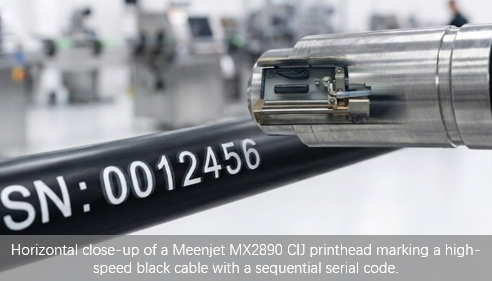
However, line managers frequently encounter two devastating printing defects: Ghosting (faint duplicate characters trailing or overlapping the main code) and Overspray (a cloudy ink mist surrounding the characters). Both defects trigger automatic vision inspection failures and lead to costly material scrap.
This technical guide breaks down the physical root causes of these print defects during high-speed cable and pipe extrusion, providing a step-by-step troubleshooting workflow.
Understanding the Root Causes
Ghosting (Charging Phase Timing Drift):
Ghosting occurs when the charge phase timing drifts out of sync with the droplet break-off frequency. In a properly tuned CIJ system, each droplet receives a precise charge level (or zero charge) at the exact moment it passes the charging electrode. When phase calibration drifts—often due to temperature swings, ink viscosity changes, or electrode contamination—droplets intended for the gutter (zero charge) or a specific deflection position receive residual or partial charge. This misdirects them to the wrong vertical position, creating a faint "shadow" of the primary character—typically trailing behind or overlapping the main code on fast-moving substrates.
Overspray (Unstable Break-Off & Static Attraction):
Overspray is caused by airborne ink satellites—tiny micro-droplets formed during the ink jet break-off process. Two primary factors increase satellite generation:
Unstable drop break-off: Caused by improper viscosity, clogged nozzle, or pump pressure fluctuations, resulting in unclean droplet separation.
Electrostatic attraction: High-speed plastic/polymer extrusion generates static charge on the substrate, attracting charged satellite drops onto the cable surface where they settle as a cloud-like haze.
Addressing both factors—clean drop formation and static elimination—is required to eliminate overspray completely.
CIJ Print Parameter Reference for Cable Extrusion Speeds
| Line Speed (m/min) | Typical Drop Frequency (kHz) | Recommended Throw Distance | Risk Level & Focus Area |
| < 50 m/min | 60 – 80 kHz | 8 – 12 mm | Low: Standard nozzle setup |
| 50 – 100 m/min | 80 – 120 kHz | 5 – 10 mm | Moderate: Monitor nozzle buildup & viscosity |
| 100 – 150 m/min | 120 – 160 kHz | 5 – 8 mm | High: Static elimination & Phase tuning critical |
| > 150 m/min | > 160 kHz | 3 – 5 mm | Very High: Micro-nozzle required (Consider Laser) |
Pro Tip: As line speed increases, the CIJ system must fire droplets faster. Ensure your printer's phase calibration and charge electrode cleanliness are verified every shift—high-frequency operation magnifies any timing errors.
Step-by-Step Troubleshooting Checklist
Eliminate Substrate Static Electricity:
Install a heavy-duty industrial anti-static bar or ionizer 50–100 mm upstream of the CIJ printhead. Ensure the extrusion line cooling trough and metal guide rollers are fully grounded to prevent static build-up on PE/PVC surfaces.
Re-Calibrate Charge Detection & Phasing:
Run an automatic phase calibration routine on your CIJ unit. Inspect the charging electrode for dried ink build-up or lint. Clean the electrode gap thoroughly with solvent; a dirty charge slot distorts the electric field and causes immediate character ghosting.
Verify Ink Viscosity & System Pressure:
If ink viscosity drops too low due to over-dilution, fluid breakup becomes unstable, generating excessive satellite drops. Check that the internal viscosity reading matches manual Zahn cup measurements. Adjust pump pressure to restore stable drop formation.
Optimize Throw Distance & Deflection Angle:
Keep the printhead nozzle strictly within 5–12 mm of the curved pipe surface. Excessive throw distance gives flying satellites time to diverge, worsening overspray distortion on fast-moving substrates.
CIJ Cable Extrusion Defect Matrix
| Defect Manifestation | Primary Root Cause | Immediate Corrective Action |
| Faint Shadow Behind Text | Charge Phasing / Dirty Electrode | Clean charge slot & rerun Auto-Phase calibration |
| Cloudy Ink Haze Around Code | High Static Charge / Low Viscosity | Ground extrusion line & re-balance solvent ratio |
| Distorted / Wavy Characters | Unstable Line Encoder Signal | Inspect shaft encoder wheel alignment & belt tension |
| Missing Vertical Strokes | Nozzle Deflection Plate Buildup | Perform printhead flush & clean high-voltage plates |
Pro Tip for Pigmented Inks: When printing on dark rubber or black HDPE cables using high-contrast pigmented inks (white or yellow), continuous agitation is mandatory. Pigmented inks contain dense titanium dioxide or chrome yellow particles that settle rapidly during standby. Uneven pigment distribution alters the conductivity of individual droplets, causing inconsistent charge acceptance—even when the charging electrode voltage is stable. This manifests as erratic deflection, unstable vertical positioning, and severe ghosting. Keep the internal magnetic stirrer active at all times, including standby mode.
Alternative Technology: Zero-Ink Fiber Laser Coding
If your extrusion line operates in extreme conditions where high static electricity, fluctuating ambient temperatures, or aggressive solvent vapors make CIJ maintenance too time-consuming, upgrading to a Non-Contact Fiber Laser Marking System eliminates ink-related defects entirely.
Laser coders use thermal or photochemical surface altering rather than flying ink drops—completely removing the risk of ghosting, overspray, or viscosity drift.
Frequently Asked Questions (FAQ)
Q1: Why does ghosting appear only when the extrusion line speeds up?
A: At higher production speeds, the CIJ printer must increase its drop emission frequency, narrowing the timing window for charge detection. If phase timing is slightly off, residual charge cannot dissipate quickly enough between high-frequency droplets, leading to speed-dependent charge crosstalk and trailing ghost characters.
Q2: Can I use standard solvent to clean the charge electrode?
A: Always use the manufacturer-approved washdown solvent specified for your ink formulation. Using unapproved cleaning fluids can leave conductive residues inside the charge slot, distorting the electric field and worsening ghosting issues.
Q3: How can I quickly tell if my CIJ defect is ghosting or overspray?
A: Use this simple visual diagnostic:
Ghosting: Creates a faint, sharp-edged shadow of the character, typically offset vertically or trailing behind the main code. It is caused by phase/charge timing errors.
Overspray: Creates a cloudy, diffused haze or mist around the entire code, with no defined character shape. It is caused by satellite droplets and static attraction.
If you see sharp shadows -> clean the charge electrode and run Auto-Phase calibration.
If you see diffused haze -> install an anti-static bar and verify ink viscosity.
Related Extrusion & Industrial Marking Guides
Substrate Setup: HDPE vs. PET Laser Marking Setup Guide
Code Adhesion: Fixing Code Rub-Off on Extruded Plastics
Flexible Packaging: QR Code Scannability on Flexible Packaging