




News & Blogs
Marking small 2D codes on Printed Circuit Board Assemblies (PCBAs) is critical for SMT component tracking and full lifecycle traceability. However, fitting a Micro QR code into a tiny space creates big headaches on the factory floor.
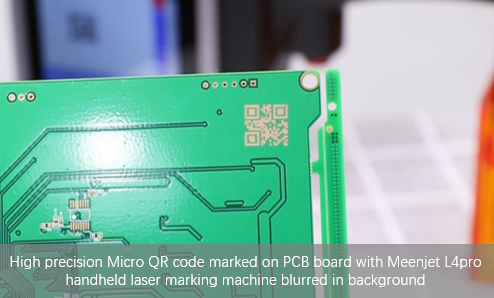
Operators often run into three major problems: the code gets blurry after high-temperature reflow soldering, washes off during flux cleaning, or can't be read by scanners due to PCB board glare.
Here is a practical troubleshooting guide to help you print clear, scannable Micro QR codes every time.
1. Solved: The Top 3 PCB QR Code Printing Headaches
Problem 1: Code Fades After Reflow Soldering (Heat Distortion)
SMT reflow ovens hit peak temperatures above . Standard inks faint, smudge, or char under this intense heat, ruining contrast.
Fix: Use specialized heat-resistant solvent inks designed for industrial inkjet code printers, or switch to a UV laser marking machine that directly alters the soldermask layer without burning the board.
Problem 2: Glare from Shiny Green/Black Soldermask (Scanning Refusal)
Shiny PCB surfaces act like mirrors under Automated Optical Inspection (AOI) scanner lights, blinding the camera lens.
Fix: Apply a matte background, or adjust the laser frequency to create a slightly textured, non-reflective surface base. (This glare-control technique is also essential when printing codes on glass containers or high-gloss transparent packaging).
Problem 3: Chemical Cleaning Washes Away the Code
Harsh flux-removal cleaning solvents and IPA washes can wipe away low-adhesion ink.
Fix: Ensure proper ink curing time, or use direct laser etching (DPM) for 100% permanent marking that resists aggressive chemical washdowns.
2. Choosing the Right Marking Machine for Your SMT Line
Equipment Type | Marking Size | Best For | Factory Advantage |
Ultra-small | High-density HDI boards, Flex PCBs | "Cold" marking with zero heat damage; creates crisp, ultra-fine lines. | |
Small | Heavy industrial & metal-core PCBs | Etches directly into metal or mask layer for extreme physical durability. | |
Standard | Offline PCB panels & raw boards | Fast setup, economical, and easy to integrate across flexible batch lines. |
Pro Tip for Production Line Setup: While a handheld inkjet printer or portable laser marker is great for offline R&D prototyping, installing an inline conveyor machine avoids hand-shaking and keeps code proportions perfectly square.
3. Quick Checklist for 100% Scannable Micro Codes
Leave a Safe Border (Quiet Zone): Don't print the code right next to copper lines, via holes, or board edges. Leave a blank border around the code so the scanner camera can locate it easily.
Keep Optics & Nozzles Clean: A dirty lens on a desktop fiber laser causes weak, blurry focal lines. Dust or dried residue on an industrial inkjet printer leads to missing rows in the QR code matrix. Clean your equipment daily!
Conclusion
Getting a high scan rate on tiny PCB QR codes isn't difficult once you match the right machine to your board surface and heat requirements. Implementing dedicated coding and marking machines ensures full PCBA traceability from SMT assembly to end-use deployment.
???? Explore Our Complete Material Traceability Matrix
Need QR code scannability solutions for other industrial substrates? Read our engineering guides:
???? Flexible Films & Plastic Packaging: Read our guide on How to Improve QR Code Scannability on Flexible Films and Plastic Packaging.
???? Metal Substrates & DPM: Optimizing DPM QR Code Quality on Metal Substrates: Fiber Laser & Etching Guide .
???? Glass & Glossy Packaging: How to Eliminate Refraction Glare for QR Code Marking on Glass & Glossy Containers