


News & Blogs
When upgrading your production line's coding and marking setup, transitioning to a laser marking machine represents a massive leap in efficiency. Leading global industrial marking solutions providers like Meenjet are helping manufacturers replace aging industrial inkjet printing machines and Thermal Transfer Overprinter (TTO) systems with high-speed, zero-consumable laser coding.
However, a major challenge remains: Can a single laser handle both rigid metals and thermally sensitive substrates? Choosing the incorrect wavelength can melt materials or result in unreadable codes. This guide ensures you select the optimal system for your production needs.
The Core Dilemma: Wavelength vs. Material
The fundamental rule of laser engineering is that the substrate must efficiently absorb the beam's wavelength to produce a permanent, high-contrast mark.
1. Metals: The Domain of the Fiber Laser
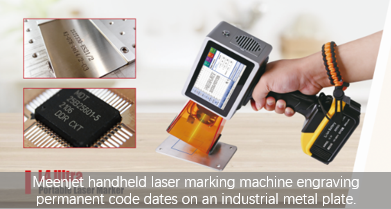
For engraving steel, aluminum, brass, or titanium, a fiber laser marking machine is the industrial gold standard. Operating at a 1,064 nm wavelength, this technology serves as a highly efficient metal marking machine, delivering permanent code dates and serialization directly onto heavy-duty components. For compact workspaces, a desktop fiber laser machine or a portable laser marker seamlessly integrates into existing workflows.
2. Plastics: The Hidden Challenge
While a fiber laser marking machine excels on metals, it struggles with many engineered polymers. High-density plastics can melt or char under continuous thermal stress.
The Exception: Dark-colored polymers (such as black ABS or Nylon) react well to fiber wavelengths, achieving a crisp, contrasting color-change effect.
The Better Alternatives: For sensitive films, clear plastics, or PET, a uv laser marking machine or a co2 laser marking machine is required. UV lasers utilize non-contact "cold marking" technology to alter material color at a molecular level without heat damage.
Fiber Laser vs. Traditional Industrial Marking Systems
How does an industrial fiber laser stack up against traditional continuous inkjet printers or thermal inkjet printer systems?
Fiber Laser Systems: Best for metals and high-density plastics. Consumables: None (zero ink or ribbons). Maintenance: Extremely low (up to 100,000 hours). Portability: Available in handheld laser marking configurations.
Industrial Inkjet Coder: Best for flexible plastics, glass, and cardboard. Consumables: Requires ink, solvents, or ribbons. Maintenance: Regular nozzle cleaning. Portability: Available as a lightweight hand held printer.
If your facility requires permanent tracking on metals and industrial plastics, a laser system is the ultimate upgrade over an aging batch coding machine setup.
3 Quick Tips to Choose Your Supplier
Verify Material Compatibility: Prior to purchasing, always coordinate with a laser marking machine manufacturer like Meenjet to perform a free sample test on your exact plastic substrate.
Determine Integration Needs: Choose between a static desktop laser marking machine, an online laser marking machine for automated conveyor lines, or a flexible handheld marking machine for oversized parts.
Evaluate Lifetime TCO: Balance the initial hardware investment against the long-term consumable savings achieved by replacing a traditional expiry date inkjet printer.
Frequently Asked Questions
Can a fiber laser print expiration dates on flexible packaging? Generally, no. Thin films will burn. For flexible food pouches, a printing machine on plastic bag application typically relies on a tij inkjet printer or a thermal transfer printer.
What is the operational lifespan of an industrial fiber laser? Most premium fiber sources deliver up to 100,000 maintenance-free hours, vastly outperforming traditional inkjet marking systems.