




News & Blogs
Extended production shutdowns—whether for seasonal maintenance, holidays, or line reconfigurations—pose a significant threat to industrial coding solutions. If left unmanaged, fluid stagnation inside an industrial inkjet printer leads to dried ink, pigment sedimentation, and clogged printheads. When production resumes, operators are often met with poor print quality, missing lines, or complete system failures that delay the entire packaging line.
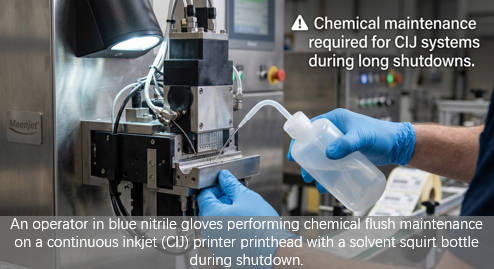
To protect your coding and marking machine investment and ensure a seamless restart, implementing a preventative maintenance routine is essential. Because thermal inkjet printers (TIJ) and continuous inkjet printers (CIJ) operate on entirely different physical principles, their preservation steps and chemical requirements are fundamentally different.
The Technical Difference: Why TIJ and CIJ Clog Differently
To understand prevention, we must examine how these coding and marking systems manage ink during downtime:
TIJ Inkjet Printers: These rely on thermal energy to launch droplets, with ink sitting directly behind the nozzle plate in a cartridge. When idle, the carrier solvent evaporates rapidly at the nozzle-air interface (a vulnerability known as de-cap time limit), leaving behind a solid polymer skin that blocks subsequent firing.
Continuous Inkjet Printers: These maintain a pressurized, recirculating loop of active ink. When a CIJ printer is powered down improperly, stagnant ink remaining in the microscopic drop generator nozzle (typically to ) and the gutter line dries into a stubborn physical plug.
1. TIJ Preservation: Cartridge Protection
For TIJ systems—whether you are operating a thermal handheld printer or a high-speed inline inkjet printer—maintenance is straightforward but highly time-sensitive.
Step-by-Step TIJ Shutdown Protocol:
Remove the Cartridge Immediately: Never leave an active ink cartridge inside an idle handheld inkjet coder or stationary printhead mount during long shutdowns.
Clean the Nozzle Face: Gently wipe the nozzle plate with a lint-free wipe dampened with the manufacturer’s recommended purging fluid. Wipe in a single, one-way motion—never scrub back and forth, as physical abrasion can damage the micro-nozzles.
Apply the Nozzle Clip: Snap the cartridge securely back into its original plastic clip (nozzle cap). This physical seal is the single most important defense against solvent evaporation.
Airtight Storage & Orientation: Place the clipped cartridge in an airtight plastic bag. Store at a stable, moderate temperature between 15°C and 25°C. Always store the cartridge horizontally (nozzles facing sideways). Storing it nozzles-down causes ink to pool and weep into the clip, while nozzles-up storage causes ink to recede, introducing air pockets (air locks) into the firing chamber that prevent a clean restart.
2. CIJ Preservation: System Flushing
An industrial continuous inkjet printer requires an active chemical approach. Because these systems run highly volatile solvents (such as MEK or Ethanol) to achieve instant dry times on non-porous packaging, a dry system is highly prone to clogging.
Step-by-Step CIJ Shutdown Protocol:
Initiate the Automated Flush Cycle: Modern industrial ink marking systems feature an automated shut-down cycle. This process pumps pure make-up solvent through the return line and nozzle to dissolve residual ink before the physical valves close.
Manual Printhead Cleaning: If the shutdown exceeds one week, open the printhead assembly. Wash the nozzle orifice, charge electrode, and gutter block thoroughly using the designated wash solvent bottle.
Drainage for Extended Storage: For shutdowns exceeding two weeks, the entire fluid system may need to be completely drained and flushed with pure solvent. This is critical in systems utilizing highly pigmented white inkjet ink, where heavy titanium dioxide particles can undergo gravity-induced sedimentation, forming hard-packed sediment in the lines.
Quick Reference: TIJ vs. CIJ Shutdown Comparison
Parameter | ||
Primary Risk | Cartridge nozzle skinning (ink drying at nozzle plate) | Ink crystallization in the return line & nozzle orifice |
Shutdown Prep Time | Less than 2 minutes | 10 to 30 minutes |
Storage Orientation | Strictly Horizontal (Avoids air locks & weeping) | N/A (Keep printhead secured and covered) |
Key Consumable | Air-tight storage clip / Nozzle cap | Flushing solvent / Wash-down fluid |
Recommended Temp | 15°C – 25°C (Stable environment) | 5°C – 45°C (Avoid freezing or extreme heat) |
What About Other Marking Technologies?
While inkjet systems are highly susceptible to stagnation, other product marking systems require entirely different shutdown protocols:
Laser Marking Machines (including fiber laser marking and co2 laser marking): These are optical, non-contact systems. Because they do not use fluid consumables, they run zero risk of clogging. Shutdowns simply require powering down the controller, clean-wiping the protective lens, and covering the unit to prevent dust accumulation on optical surfaces.
TTO / Ribbon Printers: Thermal Transfer Overprinters do not use liquid inks. However, during long shutdowns, the printhead should be cleaned with isopropyl alcohol to remove ribbon residue, and the printhead pressure mechanism should be released to prevent flat spots on the backing roller.
Summary: A Smooth Startup Begins At Shutdown
Whether you operate a portable handheld inkjet printer on the packaging floor or a high-speed batch coding machine on a continuous production line, taking a few minutes to properly clean, seal, and correctly orient your marking printer prior to a long break saves hours of troubleshooting, costly solvent flushing, or premature cartridge replacement when the factory restarts.
By standardizing these simple flushing and clipping procedures, you protect both your equipment longevity and your overall cost of ownership.