



News & Blogs
In high-speed production lines and small-scale packaging setups alike, plastic bottles (such as PET, HDPE, and PP) present a significant challenge for product identification. Few things disrupt an operation faster than seeing critical code dates smudge, smear, or wipe off entirely.
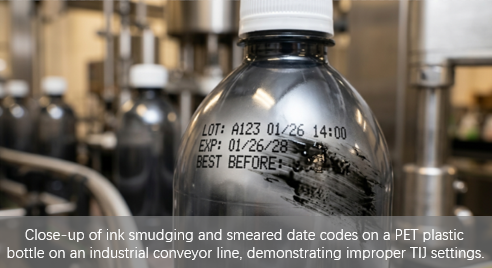
Whether you are printing tracking data with an industrial inkjet printer or using a compact handheld inkjet printer gun, ink smudging points to a mismatch between your equipment, substrate, or curing environment.
This troubleshooting guide breaks down the root causes of ink smudging on plastic bottles and provides immediate engineering solutions to restore crisp, permanent batch marking.
The Root Cause: Why Plastic Invites Smudging
Unlike paper or corrugated cardboard, plastics are non-porous materials. They cannot absorb liquid carrier agents. When a date code printer deposits ink onto a plastic bottle, the code relies entirely on rapid solvent evaporation or UV chemical cross-linking to bond with the smooth surface. If the chemistry or timing is off, the ink remains fluid and highly vulnerable to smearing.
4-Step Troubleshooting Checklist
If your batch coding machine is producing blurred or smeared results, audit your production line using these steps:
1. Verify Ink Chemistry and Substrate Compatibility
The most common mistake in plastic bottle coding is using a water-based ink cartridge in a thermal inkjet printer (TIJ). Water-based inks require porous surfaces. For plastics, you must use high-adhesion, solvent-based fast-drying inks.
Solution: For dark plastics or amber glass, ensure your inkjet printer white ink formulas or high-contrast solvent fluids are freshly agitated and rated for low-surface-energy plastics.
2. Audit the Drying and Mechanical Dwell Time
If you are utilizing an inline inkjet printer integrated into a conveyor, the distance between the printhead and the next mechanical contact point (such as a guide rail, packing box, or sensor) might be too short.
Solution: Increase the physical distance between the inkjet bottle printer and the collection zone to allow the solvent its required 1 to 2 seconds of dry time. If space is constrained, consider adding an inline air blower.
3. Optimize Printhead Distance and Pulse Width
When using an inkjet coder machine—or operating a portable handheld printer on curved or uneven bottle surfaces—an inconsistent throw distance (the gap between the nozzle and the plastic) distorts the droplet trajectory. Excessively high ink density settings can also cause fluids to pool and smear on non-porous contours.
Solution: Keep the nozzle of your hand held inkjet printer or inline head strictly within 2–5mm of the plastic substrate, ensuring stability along curved surfaces. Lower the print resolution (e.g., from 600 DPI to 300 DPI) or decrease the pulse width in your device settings to reduce the volume of ink deposited per character, allowing for faster flash-drying.
4. Control Environmental Moisture and Surface Condensation
Plastic bottles coming straight out of cold-filling lines often develop a microscopic layer of moisture (condensation). Printing over water barriers prevents solvent-based inks from adhering to the underlying plastic.
Solution: Position an air knife or drying station immediately upstream of your expiry date inkjet printer to ensure a perfectly bone-dry surface before marking.
Tech Comparison: Inkjet vs. Laser Coding Solutions for Plastics
If ink-related variables continue to conflict with your factory environment or chemical exposure requirements, a structural change in your coding marking technology may be necessary.
Technology Type | Mechanism | Risk of Smudging | Best Used For |
TIJ Inkjet Printer | Cartridge-based thermal drop-on-demand thermal printing. | Low (If using high-adhesion solvent inks). | Flexible production, quick changeovers, handheld coding machine applications. |
Continuous Inkjet Printer (CIJ) | Pressurized continuous stream of fast-drying MEK inks. | Very Low (Extremely fast evaporation rates). | High-speed, 24/7 industrial bottling operations. |
CO2 Laser Marking Machine | Thermal molecular ablation changing the surface structure. | Zero (Permanent, completely inkless marking). | PVC, PET, thick plastics, permanent anti-counterfeiting tracking. |
UV Laser Marking Machine | Cold photochemical reaction modifying surface molecules. | Zero (Damage-free high-contrast marking). | High-density polyethylene (HDPE), thin-walled medical packaging. |
Moving Beyond Ink Issues
For facilities facing extreme environments—such as greasy processing zones or chemical washdowns—transitioning from traditional ink marking systems to a permanent laser coding system removes consumables from the equation entirely. A flying laser marking machine running a CO2 or UV source physically alters the plastic surface structure, rendering smudging technically impossible while offering a lower total cost of ownership over millions of cycles.
Ultimately, for mobile or scaling production lines, pairing a reliable portable handheld inkjet printer with a high-adhesion, solvent-based ink cartridge remains the most adaptable and cost-effective strategy to achieve permanent, indelible codes.